I3D 2011

The website for I3D 2011 is now up, including the time/place and CFP. I3D will be in San Francisco next year, from February 18-20th. I3D probably has a higher percentage of graphics papers relevant to games than any other conference; this year five of the papers described techniques already in use in games (including high-profile titles like Batman: Arkham Asylum and Civilization 5), and many of the other papers were also highly relevant. Unfortunately, very few game developers attend; I hope next year’s location (San Francisco is home to a large number of developers) will help.

I3D is a great small conference to publish real-time rendering papers. One advantage it has for authors over Eurographics conferences like EGSR, and co-sponsored conferences like HPG and SCA (in “Europe” years) is that it is not subject to Eurographics’ monumentally stupid “authors can’t post copies of their papers for a year after the conference” policy. This policy, of course, hurts the chance of your paper being cited by making it harder for people to read it – brilliant! Hopefully EG will see the error of its ways soon – until then, you are better off sending your papers to non-EG conferences like I3D.

SIGGRAPH 2010 Game Content Roundup

With less than two weeks until the conference, here’s my final pre-SIGGRAPH roundup of all the game development and real-time rendering content. This is to either to help convince people who are still on the fence about attending (unlikely at this late date) or to help people who are trying to decide which sessions to go to (more likely). If you won’t be able to attend SIGGRAPH this year, this might at least help you figure out which slides, videos, and papers to hunt for after the conference.

First of all, the SIGGRAPH online scheduler is invaluable for helping to sort out all the overlapping sessions (even if you just “download” the results into Eric’s lower-tech version). The iPhone app may show up before the conference, but given the vagaries of iTunes app store approval, I wouldn’t hold my breath.

The second resource is the Games Focus page, which summarizes the relevant content for game developers in one handy place. It makes a good starting point for building your schedule; the rest of this post goes into additional detail.

My previous posts about the panels and the talks, and several posts about the courses go into more detail on the content available in these programs.

Exhibitor Tech Talks are sponsored talks by various vendors, and are often quite good. Although the Games Focus page links to the Exhibitor Tech Talk page, for some reason that page has is no information about the AMD and NVIDIA tech talks (the Intel talk on Inspecting Complex Graphics Scenes in a Direct X Pipeline, about their Graphics Performance Analyzer tool, could be interesting). NVIDIA does have all the details on their tech talks at their SIGGRAPH 2010 page; the ones on OpenGL 4.0 for 2010, Parallel Nsight: GPU Computing and Graphics Development in Visual Studio, and Rapid GPU Ray Tracing Development with NVIDIA OptiX look particularly relevant. AMD has no such information available anywhere: FAIL.

One program not mentioned in the Games Focus page is a new one for this year: SIGGRAPH Dailies! where artists show a specific piece of artwork (animation, cutscene sequence, model, lighting setup, etc.) and discuss it for two minutes. This is a great program, giving artists a unique place to showcase the many bits of excellence that go into any good film or game. Although no game pieces got in this year, the show order includes great work from films such as Toy Story 3, Tangled, Percy Jackson, A Christmas Carol, The Princess and The Frog, Ratatouille, and Up. The show is repeated on Tuesday and Wednesday overlapping the Electronic Theater (which also should not be missed; note that it is shown on Monday evening as well).

One of my favorite things about SIGGRAPH is the opportunity for film and game people to talk to each other. As the Game-Film Synergy Chair, my primary responsibility was to promote content of interest to both. This year there are four such courses (two of which I am organizing and speaking in myself): Global Illumination Across Industries, Color Enhancement and Rendering in Film and Game Production, Physically Based Shading Models in Film and Game Production, and Beyond Programmable Shading I & II.

Besides the content specifically designed to appeal to both industries, a lot of the “pure film” content is also interesting to game developers. The Games Focus page describes one example (the precomputed SH occlusion used in Avatar), and hints at a lot more. But which?

My picks for “film production content most likely to be relevant to game developers”: the course Importance Sampling for Production Rendering, the talk sessions Avatar in Depth, Rendering Intangibles, All About Avatar, and Pipelines and Asset Management, the CAF production sessions Alice in Wonderland: Down the Rabbit Hole, Animation Blockbuster Breakdown, Iron Man 2: Bringing in the “Big Gun”, Making “Avatar”, The Making of TRON: LEGACY, and The Visual Style of How To Train Your Dragon, and the technical papers PantaRay: Fast Ray-Traced Occlusion Caching, An Artist-Friendly Hair Shading System, and Smoothed Local Histogram Filters. (unlike much of the other film production content, paper presentation videos are always recorded, so if a paper presentation conflicts with something else you can safely skip it).

Interesting, but more forward-looking film production stuff (volumetric effects and simulations that aren’t feasible for games now but might be in future): the course Volumetric Methods in Visual Effects, the talk sessions Elemental Training 101, Volumes and Precipitation, Simulation in Production, and Blowing $h!t Up, and the CAF production session The Last Airbender: Harnessing the Elements: Earth, Air, Water, and Fire.

Speaking of forward-looking content, SIGGRAPH papers written by academics (as opposed to film professionals) tend to fall in this category (in the best case; many of them are dead ends). I haven’t had time to look at the huge list of research papers in detail; I highly recommend attending the Technical Papers Fast-Forward to see which papers are worth paying closer attention to (it’s also pretty entertaining).

Some other random SIGGRAPH bits:

  • Posters are of very mixed quality (they have the lowest acceptance bar of any SIGGRAPH content) but quickly skimming them doesn’t take much time, and there is sometimes good stuff there. During lunchtime on Tuesday and Wednesday, the poster authors are available to discuss their work, so if you see anything interesting you might want to come back then and ask some questions.
  • The Studio includes several workshops and presentations of interest, particularly for artists.
  • The Research Challenge has an interesting interactive haunted house concept (Virtual Flashlight for Real-Time Scene Illumination and Discovery) presented by the Square Enix Research and Development Division.
  • The Geek Bar is a good place to relax and watch streaming video of the various SIGGRAPH programs.
  • The SIGGRAPH Reception, the Chapters Party, and various other social events throughout the week are great opportunities to meet, network, and talk graphics with lots of interesting and talented people from outside your regular circle of colleagues.

I will conclude with the list of game studios presenting at SIGGRAPH this year: Activision Studio Central, Avalanche Software, Bizarre Creations, Black Rock Studio, Bungie, Crytek, DICE, Disney Interactive Research, EDEN GAMES, Fantasy Lab, Gearbox, LucasArts, Naughty Dog, Quel Solaar, tri-Ace, SCE Santa Monica Studio, Square Enix R&D, Uber Entertainment, Ubisoft Montreal, United Front Games, Valve, and Volition. I hope for an even longer list in 2011!
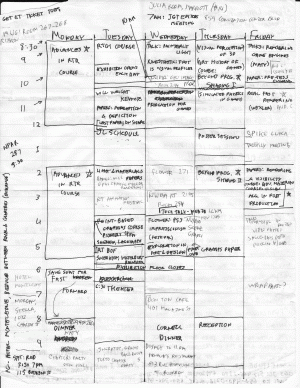
Another SIGGRAPH Scheduler

SIGGRAPH 2009 scheduleI’ve messed around with various scheduling methods over the years for SIGGRAPH, but find I dislike the form factor of PDA-like devices: you can see a few hours, or maybe a day’s activities at best. Taking notes can be tiresome, you need lots of clicks needed to find stuff, and sometimes the battery dies.

So for the past few years I’ve locked onto classic graphite stick & cellulose technology. Honestly, I like it a lot: folds up and fits in my pocket, it’s easy to see conflicts among events, I can instantly figure out when I’m free, and lots of room on the back for notes and whatnot. At the end of the conference I automatically have a hardcopy, no printing necessary. I mention it here as an honestly useful option, as this low-tech approach works for me. The main drawback is that you look like a nerd to other nerds. Hey, I like my iPod Touch, I’ll put the SIGGRAPH Advanced Program on it with Discover, but the sheet o’ paper will be my high-level quick & dirty way to navigate and write down information. It’s sort of how I like RememberTheMilk for reminders more than Google Calendar: I can enter data very simply, without time wasted navigating the UI. Now if only the sheet of paper would automatically unfold when I take it out of my pocket, I could increase efficiency by 0.43 seconds.

Random graphics paper title generator

Try it – it’s a blast (keep hitting “refresh” to see new titles). Here’s a few that I got:

  • Bidirectional Rendering of Caustics for Light Fields
  • Reflective Normal-mapped Light Fields
  • Rendering of Inverse Geometry
  • Texturing of Multi-resolution Geometry using Polygonal Approximation
  • Displacement Mapping of Reflective Geometry for Surfaces

Can’t tell them from the real paper titles…

More SIGGRAPH Course Updates

After my last SIGGRAPH post, I spent a little more time digging around in the SIGGRAPH online scheduler, and found some more interesting details:

Global Illumination Across Industries

This is another film-game crossover course. It starts with a 15-minute introduction to global illumination by Jaroslav Křivánek, a leading researcher in efficient GI algorithms. It continues with six 25-30 minutes talks:

  • Ray Tracing Solution for Film Production Rendering, by Marcos Fajardo, Solid Angle. Marcos created the Arnold raytracer which was adopted by Sony Pictures Imageworks for all of their production rendering (including CG animation features like Cloudy with a Chance of Meatballs and VFX for films like 2012 and Alice in Wonderland). This is unusual in film production; most VFX and animation houses  use rasterization renderers like Renderman.
  • Point-Based Global Illumination for Film Production, by Per Christensen, Pixar. Per won a Sci-Tech Oscar for this technique, which is widely used in film production.
  • Ray Tracing vs. Point-Based GI for Animated Films, by Eric Tabellion, PDI/Dreamworks. Eric worked on the global illumination (GI) solution which Dreamworks used in Shrek 2; it will be interesting to hear what he has to say on the differences between the two leading film production GI techniques.
  • Adding Real-Time Point-based GI to a Video Game, Michael Bunnell, Fantasy Lab. Mike was also awarded the Oscar for the point-based technique (Christophe Hery was the third winner). He actually originated it as a real-time technique while working at NVIDIA; while Per and Christophe developed it for film rendering, Mike founded Fantasy Lab to further develop the technique for use in games.
  • Pre-computing Lighting in Games, David Larsson, Illuminate Labs. Illuminate Labs make very good prelighting tools for games; I used their Turtle plugin for Maya when working on God of War III and was impressed with its speed, quality and robustness.
  • Dynamic Global Illumination for Games: From Idea to Production, Anton Kaplanyan, Crytek. Anton developed the cascaded light propagation volume technique used in CryEngine 3 for dynamic GI; the I3D 2010 paper describing the technique can be found on Crytek’s publication page.

The course concludes with a 5 minute Q&A session with all speakers.

An Introduction to 3D Spatial Interaction With Videogame Motion Controllers

This course is presented by Joseph LaViola (director of the University of Central Florida Interactive Systems and User Experience Lab) and Richard Marks from Sony Computer Entertainment (principal inventor of the Eyetoy, Playstation Eye, and Playstation Move). Richard Marks gives two 45-minute talks, one on 3D Interfaces With 2D and 3D Cameras and one on 3D Spatial Interaction with the PlayStation Move. Prof. LaViola discusses Common Tasks in 3D User Interfaces, Working With the Nintendo Wiimote, and 3D Gesture Recognition Techniques.

Recent Advances in Real-Time Collision and Proximity Computations for Games and Simulations

After an introduction to the topic of collision detection and proximity queries, this course goes over recent research in collision detection for games including articulated, deformable and fracturing models. It concludes with optimization-oriented talks such as GPU-Based Proximity Computations (presented by Dinesh Manocha, University of North Carolina at Chapel Hill, one of the most prominent researchers in the area of collision detection), Optimizing Proximity Queries for CPU, SPU and GPU (presented by Erwin Coumans, Sony Computer Entertainment US R&D, primary author of the Bullet physics library, which is widely used for both games and feature films), and PhysX and Proximity Queries (presented by Richard Tonge, NVIDIA, one of the architects of the AGEIA  physics processing unit – the company was bought by NVIDIA and their software library formed the basis of the GPU-accelerated PhysX library).

Advanced Techniques in Real-Time Hair Rendering and Simulation

This course is presented by Cem Yuksel (Texas A&M University) and Sarah Tariq (NVIDIA). Between them, they have done a lot of the recent research on efficient rendering and simulation of hair. The course covers all aspects of real-time hair rendering: data management, the rendering pipeline, transparency, antialiasing, shading, shadows, and multiple scattering. It concludes with a discussion of real-time dynamic simulation of hair.

Ray Tracing Solution for Film Production Rendering
Fajardo

2:40 pm
Point-Based Global Illumination for Film Production
Christensen

3:05 pm
Ray Tracing vs. Point-Based GI for Animated Films
Tabellion

3:30 pm
Break 

3:45 pm
Adding Real-Time Point-based GI to a Video Game
Bunnell

4:15 pm
Pre-computing Lighting in Games
Larsson

4:45 pm
Dynamic Global Illumination for Games: From Idea to Production Kaplanyan

5:10 pm
Conclusions, Q & A
Ray Tracing Solution for Film Production Rendering

Fajardo

2:40 pm

Point-Based Global Illumination for Film Production

Christensen

3:05 pm

Ray Tracing vs. Point-Based GI for Animated Films

Tabellion

3:30 pm

Break

3:45 pm

Adding Real-Time Point-based GI to a Video Game

Bunnell

4:15 pm

Pre-computing Lighting in Games

Larsson

4:45 pm

Dynamic Global Illumination for Games: From Idea to Production Kaplanyan

5:10 pm

Conclusions, Q & A

All

All

Update on Splinter Cell: Conviction Rendering

In my recent post about Gamefest 2010, I discussed Stephen Hill’s great presentation on the rendering techniques used in Splinter Cell: Conviction.

Since then, Stephen contacted me – it turns out I got some details wrong, and he also provided me with some additional details about the techniques in his talk. I will give the corrections and additional details here.

  1. What I described in the post as a “software hierarchical Z-Buffer occlusion system” actually runs completely on the GPU. It was directly inspired by the GPU occlusion system used in ATI’s “March of the Froblins” demo (described here), and indirectly by the original (1993) hierarchical z-buffer paper. Stephen describes his original contribution as “mostly scaling it up to lots of objects on DX9 hardware, piggy-backing other work and the 2-pass shadow culling”. Stephen promises more details on this “in a book chapter and possibly… a blog post or two” – I look forward to it.
  2. The rigid body AO volumes were initially inspired by the Ambient Occlusion Fields paper, but the closest research is an INRIA tech report that was developed in parallel with Stephen’s work (though he did borrow some ideas from it afterwards).
  3. The character occlusion was not performed using capsules, but via nonuniformly-scaled spheres. I’ll let Stephen speak to the details: “we transform the receiver point into ‘ellipsoid’-local space, scale the axes and lookup into a 1D texture (using distance to centre) to get the zonal harmonics for a unit sphere, which are then used to scale the direction vector. This works very well in practice due to the softness of the occlusion. It’s also pretty similar to Hardware Accelerated Ambient Occlusion Techniques on GPUs although they work purely with spheres, which may simplify some things. I checked the P4 history, and our implementation was before their publication, so I’m not sure if there was any direct inspiration. I’m pretty sure our initial version also predated Real-time Soft Shadows in Dynamic Scenes using Spherical Harmonic Exponentiation since I remember attending SIGGRAPH that year and teasing a friend about the fact that we had something really simple.”
  4. My statement that the downsampled AO buffer is applied to the frame using cross-bilateral upsampling was incorrect. Stephen just takes the most representative sample by comparing the full-resolution depth and object IDs against the surrounding down-sampled values. This is a kind of “bilateral point-sampling” which apparently works surprisingly well in practice, and is significantly cheaper than a full bilateral upsample. Interestingly, Stephen did try a more complex filter at one point: “Near the end I did try performing a bilinearly-interpolated lookup for pixels with a matching ID and nearby depth but there were failure cases, so I dropped it due to lack of time. I will certainly be looking at performing more sophisticated upsampling or simply increasing the resolution (as some optimisations near the end paid off) next time around.”

A recent blog post on Jeremy Shopf’s excellent Level of Detail blog mentions similarities between the sphere technique and one used for AMD’s ping-pong demo (the technique is described in the article Deferred Occlusion from Analytic Surfaces in ShaderX7). To me, the basic technique is reminiscent of Inigo Quilez‘ article on analytical sphere ambient occlusion; an HPG 2010 paper by Morgan McGuire does something similar with triangles instead of spheres.

Although the technique builds upon previous ones, it does add several new elements, and works well in the game. The technique does suffer from multiple-occlusion; I wonder if a technique similar to the 1D “compensation map’ used by Morgan McGuire might help.

SIGGRAPH Scheduler & Course Update

For anyone still working on their SIGGRAPH 2010 schedule, SIGGRAPH now has an online scheduler available. They are also promising an iPhone app, but this has not yet materialized. Most courses (sadly, only one of mine) now have detailed schedules. These reveal some more detail about two of the most interesting courses for game and real-time rendering developers:

Advances in Real-Time Rendering in 3D Graphics and Games

The first half, Advances in Real-Time Rendering in 3D Graphics and Games I (Wednesday, 28 July, 9:00 AM – 12:15 PM, Room 515 AB) starts with a short introduction by Natalya Tatarchuk (Bungie), and continues with four 45 to 50-minute talks:

  • Rendering techniques in Toy Story 3, by John Ownby, Christopher Hall and Robert Hall (Disney).
  • A Real-Time Radiosity Architecture for Video Games, by Per Einarsson (DICE) and Sam Martin (Geomerics)
  • Real-Time Order Independent Transparency and Indirect Illumination using Direct3D 11, by Jason Yang and Jay McKee (AMD)
  • CryENGINE 3: Reaching the Speed of Light, by Anton Kaplayan (Crytek)

The second half, Advances in Real-Time Rendering in 3D Graphics and Games II (Wednesday, 28 July, 2:00 PM – 5:15 PM, Room 515 AB) continues with five more talks (these are more variable in length, ranging from 25 to 50 minutes):

  • Sample Distribution Shadow Maps, by Andrew Lauritzen (Intel)
  • Adaptive Volumetric Shadow Maps, by Marco Salvi (Intel)
  • Uncharted 2: Character Lighting and Shading, by John Hable (Naughty Dog)
  • Destruction Masking in Frostbite 2 using Volume Distance Fields, by Robert Kihl (DICE)
  • Water Flow in Portal 2, by Alex Vlachos (Valve)

And concludes with a short panel (Open Challenges for Rendering in Games and Future Directions) and Q&A session by all the course speakers.

Beyond Programmable Shading

The first half,  Beyond Programmable Shading I (Thursday, 29 July, 9:00 AM – 12:15 PM, Room 515 AB) includes seven 20-30 minute talks:

  • Looking Back, Looking Forward, Why and How is Interactive Rendering Changing, by Mike Houston (AMD)
  • Five Major Challenges in Interactive Rendering, by Johan Andersson (DICE)
  • Running Code at a Teraflop: How a GPU Shader Core Works, by Kayvon Fatahalian (Stanford)
  • Parallel Programming for Real-Time Graphics, by Aaron Lefohn (Intel)
  • DirectCompute Use in Real-Time Rendering Products, by Chas. Boyd (Microsoft)
  • Surveying Real-Time Beyond Programmable Shading Rendering Algorithms, by David Luebke (NVIDIA)
  • Bending the Graphics Pipeline, by Johan Andersson (DICE)

The second half, Beyond Programmable Shading II (Thursday, 29 July, 2:00 PM – 5:15 PM, Room 515 AB) starts with a short “re-introduction” by Aaron Lefohn (Intel) continues with five 20-35 minute talks:

  • Keeping Many Cores Busy: Scheduling the Graphics Pipeline, by Jonathan Ragan-Kelley (MIT)
  • Evolving the Direct3D Pipeline for Real-Time Micropolygon Rendering, by Kayvon Fatahalian (Stanford)
  • Decoupled Sampling for Real-Time Graphics Pipelines, by Jonathan Ragan-Kelley (MIT)
  • Deferred Rendering for Current and Future Rendering Pipelines, by Andrew Lauritzen (Intel)
  • PantaRay: A Case Study in GPU Ray-Tracing for Movies, by Luca Fascione (Weta) and Jacopo Pantaleoni (NVIDIA)

and closes with a 15-minute wrapup (What’s Next for Interactive Rendering Research?) by Mike Houston (AMD) followed by a 45-minute panel (What Role Will Fixed-Function Hardware Play in Future Graphics Architectures?) by all the course speakers Mike Houston, Kayvon Fatahalian, and Johan Andersson, joined by Steve Molnar (NVIDIA) and David Blythe (Intel) (thanks to Aaron Lefohn for the update).

Both of these courses look extremely strong, and I recommend them to any SIGGRAPH attendee interested in real-time rendering (I definitely plan to attend them!)

Four presentations by DICE is an unusually large number for a single game developer, but that isn’t the whole story; they are actually doing two additional presentations in the Stylized Rendering in Games course, for a total of six!

“Video Game Optimization” – a good book

I had the chance to spend some quality time with Preisz & Garney’s recent book “Video Game Optimization” a few weeks back, as I was trapped in a 14 hour plane flight. I hardly spent all that time with it, though I probably should have spent more. Instead, “Shutter Island” and “It’s Complicated” (with bad audio) are four hours out of my life I’ll never get back.

This book goes from soup to nuts on the topic: types of optimization, how to set and achieve goals, discussion of specific tools (VTune, PIX, PerfHUD, etc.), where bottlenecks can occur and how to test for them, and in-depth coverage of CPU and GPU issues. Graphics and engine performance are the focus, including multicore and networking optimization, plus a chapter on consoles and another on managed languages. Some of the information is in the “obvious if you’ve done it before” category, but critical knowledge if you haven’t, e.g., the first thing to do when optimizing is to create some good benchmark tests and lay down the baselines.

There are many specific tips, such as turning on the DirectX Debug runtime and seeing if any bugs are found. Even if your application appears to run fine with problems flagged, the fact that they’re being flagged is a sign of lost performance (the API has to recover from your problem) or possible bugs. I hadn’t really considered that aspect (“code works even with the warnings, why fix it?”), so plan to go back to work with renewed vigor in eliminating these when seen.

I also liked reading about how various optimizing compilers work nowadays. The main takeaway for me was to not worry about little syntactic tricks any more, most modern optimizers are good enough to make the code quite fast.

There’s very little in this book with which I can find fault. I tested a few terms against the index. About the only lack I found was for the “small batch problem“,  where it pays to merge small static meshes into a single large mesh when possible. This topic does turn out to be covered (Chapter 8), but the index has nothing under “batch”, “batching”, “small batch”, etc. There is also no index entry for “mesh”. So the index, while present (and 12 pages long), does have at least one hole I could detect. There are other little index mismatches, like “NVIDIA PerfHUD Tool” and “NvPerfHud Tool” being separate entries, with different pages listed. Typo-wise, I found one small error on page 123, first line should say “stack” instead of “heap”, I believe.

Executive summary: it’s a worthwhile book for just about anyone interested in optimization. These guys are veteran experts in this field, and the book gives specific advice and practical tips in many areas. A huge range of topics are covered, the authors like to run various experiments and show where problems can occur (sometimes the cases are a bit pathological, but still interesting), and there are lots of bits of information to mull over. Long and short, recommended if you want to know about this subject.

To learn more: first, look inside the book on Amazon. We mentioned here before Eric Preisz’s worthwhile article on videogame optimization on Gamasutra. A very early outline of the book appears on vertexbuffer.com. For me, it’s great to see that this is a passion for the first author – that comes through loud and clear in this book. I’ve added it to our recommended books section.

One little update: Carmack’s inverse sqrt trick, mentioned in the book on page 155, is dated for the PC. According to Ian Ameline, “It has been obsolete since the Pentium 3 came out with SSE. The rsqrtss/rsqrtps instructions are faster still and have better and more predictable accuracy. Rsqrtss + one iteration of Newton/Raphson gives 22 (of 23) bits of accuracy, guaranteed.”

Conference Schedule Followup

Last month I noted some resources for finding out about graphics conference due dates and meeting dates. Naty pointed out that we, in fact, host one ourselves, by Ke-Sen Huang. Other people noted this nice one and this detailed one.

I’m posting today because Yamauchi Hitoshi has updated his own conference calendar (due to suggestions from readers of this blog), and also made the generator free software. He originally just made this page for himself, but the power of the web and all that… I like the layout a lot. The visual presentation of deadlines, notifications, and actual conference date is (I imagine) quite useful for deciding where to submit a paper and what alternatives there are if it is not immediately accepted.