Author-Izer, and what do publishers provide

There’s a new service provided by ACM’s Digital Library: Author-Izer. Short version: if you have published something with the ACM, and you have a preprint of the paper on your own or your company’s website, you can provide the ACM DL this link for your article and they’ll put it with the article reference. This is fairly sporting of the ACM. If you’re an author it’s worth this bit of effort to give your work wider dissemination. Linking also can provide the ACM with download statistics from your site and so give a better sense of the impact of your paper (or at least inflate your statistics compared to people not using Author-Izer).

As a reader without an ACM DL subscription, it’s still better to go to Ke-Sen Huang’s site or Google Scholar, where these external author sites have been collected without each author’s effort. For example, free preprints of 95% of SIGGRAPH 2011 papers are linked on Ke-Sen’s page. In a perfect world, the ACM would simply hire Ke-Sen for a few days and have him add all his external links of authors’ sites to their database. I’d personally toss in $20 towards that effort. I suspect there are 18 reasons given why this would not be OK – “we want individual authors to control their links” (but why not give a default link if the author has not provided one?), “we’re not comfortable having a third party provide this information” (so it’s better to have no information than potentially incorrect information leading you, at worst, to a dead link?), or the catch-all “that’s not how we do things” (clearly).

As Bernie Rous discusses, there’s a tension at the ACM between researchers, who want the widest dissemination of their work, and professional staff, who are concerned about the financial health of the organization. Author-Izer helps researchers, but there’s little direct benefit to the ACM’s bottom line. Unfortunately, currently the Author-Izer service seems to be virtually unknown. For example, the SIGGRAPH 2011 table of contents appears to have no Author-Izer links, though perhaps I’m missing them. I hope this post will help publicize this service a bit.

It’s nice that the ACM allows authors to self-archive, where they can provide preprints of their own work on their website or their institution’s. Most scholarly journals allow this archiving of preprints – more than 90%, according to one writer (and more that 60% allow self-archiving of the refereed final draft, which the ACM does not allow). For authors at academic institutions with such archives, great, easily done; for authors at games companies, film companies, self-employed, etc., it’s catch-as-catch-can. If the author hosts his own work and is hit by a meteor, or just loses interest, his website eventually fades away and the article is then available only behind a paywall. One understandable reason for ACM’s “must be hosted by the author or his institution” clause is that it disallows lower-cost paywalls from competing. But why not just specify that? I can see a non-compete clause like “the author will not host his preprint behind a paywall” (a restriction the ACM doesn’t currently have), but otherwise who cares where the article is hosted, as long as it’s free to download?

This restriction feels like a business model founded on being a PITA: instead of uploading his article to some central free access site and never thinking about it again, each author needs to keep track of access and deal with job changes, server reorganizations and redirects, company bankruptcy or purchase, Author-Izer updates, and anything else that can make his website go off the radar. Pose this problem to a thousand authors and the free system will be inherently weak and ineffectual, making the pay version more desirable.

I believe that many people in the ACM have their hearts in the right place, there’s no conspiracy here. However, the tension of running a paywall service like the Digital Library gives a “one hand tied behind my back” feel to efforts at more open access. If there were no economic constraints, clearly the ACM DL would be free and there would be no real point to Author-Izer. Right now there still are these financial concerns, very real ones.

A journal publisher used to offer:

  • Physical journal printing and binding
  • Copy editing, illustrations, and layout
  • Peer review and professional editors
  • Archiving
  • Distribution to subscribers and institutions
  • Reputation

The physical artifact of the journal itself is becoming rarer, and authors now do copy editing, illustrations, and most to all of the layout. The technical editors and reviewers are all unpaid, so their contributions are separate from the publisher itself – many journals have abandoned their publishers, as the recent Elsevier boycott has highlighted. So what is left that publishers provide?

Another way to look at it: what if publishers suddenly disappeared? Different systems would supplant their services, for good or ill: Google, for instance, might provide archiving for free (they already do this for magazines like Popular Science). Distribution is as simple as “get on the mailing list.” Reputation is probably the one with most long-term value. I don’t think I’d instead want to have a reddit up/down vote system, given the various problems it has. CiteSeer and Google Scholar are pretty good at determining reputation by citation count. You can even check your own citation count for free. There are ways of determining a paper’s impact beyond simple citation counts, lots of people think about this.

I can imagine a few answers for why publishers matter – these disconnected solutions I mentioned are not necessarily the best answers. However, the burden of proof is on the publisher, both commercial and non-profit, to justify its continued existence. It will be interesting how the various open access initiatives play out and how they affect publishers.

Only Four Days for SIGGRAPH 2012 Real-Time Live Submissions

One of the best SIGGRAPH venues for showing off real-time rendering applications, Real-Time Live, has a deadline on April 9th – just four days away.

SIGGRAPH Real-Time Live is a showcase of the very best real-time graphics of the year, running live before a large audience of the world’s top graphics researchers and practitioners.

Presentations are about 5-10 minutes long, and typically involve one presenter running the application while another discusses some key technical features. The trailer can give an idea as to what these presentations are like. Previous year’s Real-Time Live presentations have included games such as “God of War III”, “Fight Night”, and “Blur”, graphics demos from GPU & engine vendors as well as the demoscene, and other cutting-edge examples of the best of real-time graphics – scientific visualization, medical imaging, you name it.

The deadline is only 3-4 days away, but fortunately submission to the program is easy, requiring only five minutes of footage and filling out some web forms. If you’ve worked on any kind of real-time graphics application, you may want to consider submitting it to this unique program.

SIGGRAPH 2012 Hotel Registration Open

Go get your hotel reservation for SIGGRAPH 2012 now. Reservations can be cancelled with no cost up to July 19th, so if you think there’s the slightest chance you’ll go, grab a room now.

The HQ hotel and the Figueroa are already gone. The Ritz Milner is certainly cheap and pretty close, but some TripAdvisor reviews eventually scared me off. I then switched to the Luxe City Center (used to be a Holiday Inn), as I prefer being close to the convention center. But I recall complaints about things like the WIFI stinking at the old Holiday Inn, and the place is even pricier now. So I rebooked yet again into The Sheraton, as a pretty good compromise among the factors of cost, quality, and location – being more downtown can be good, as you’re closer to restaurants and other nighttime activities.

English Translations of tri-Ace CEDEC 2011 Slides Available

Yoshiharu Gotanda, the CEO and CTO of tri-Ace, has given many excellent graphics presentations over the years, mostly focused on physically based real-time rendering. Gotanda-san’s presentations are hosted on the tri-Ace research webpage. Some of these were originally given in English; these include presentations at  GDC 2005, 2009 and 2012, as well as SIGGRAPH 2010 courses on shading (slides, course notes) and color (slides, course notes). However, many of Gotanda-san’s presentations were given in Japanese at the CEDEC conference, and the slides are also in Japanese.

Fortunately, the slides for two of these presentations (from CEDEC 2011) have been translated into English, in a collaboration between Gotanda-san and Marc Heng (Square Enix Japan). In addition, reviews of the English version were performed by Sébastien Lagarde (DONTNOD Entertainment) and myself. These presentations deal with the theory and implementation of physically based rendering used in the tri-Ace 2011 demo trailer, as well as forthcoming titles. Both presentations are highly recommended.

Hopefully in the future, other good CEDEC graphics presentations by Gotanda-san and others (e.g. Masaki Kawase) will be translated into English.

1200 Books You May Have Rented

If you’re a member of ACM, you have access to about 1200 books online through Safari and Books24x7. Safari’s catalog is here, Books24x7 is here. Just login using your ACM ID & password. I can’t say the book selection is that exciting, some are half a decade old or older (bad for books about APIs), though there are few that might be of interest. If nothing else, there are some guides to popular packages and languages that might help you out.

Worth a reminder: if you’re an ACM SIGGRAPH member, you also get access to essentially all computer graphics papers in the ACM’s Digital Library. I took a peek today to see if the I3D 2012 papers were up yet (the conference runs this weekend) – no joy there, though 2011’s are available. At least, I’m pretty sure 2012’s are not up. Personally, I find their searcher kind of poor if you want to search through proceedings, but is otherwise serviceable for individual articles. As usual, Ke Sen Huang’s page is the place to go to get most of the latest articles (with no membership needed).

Oh, just to reel off some other free books that might be of interest: Autodesk’s “Imagine Design Create” book, a free PDF. More for designers but full of pretty pictures and there’s stuff on game graphic design, along with films and much else. If you’d rather have the coffee-table version, get it on Amazon.

Me, I just finished the crowd-sourced sci-fi “Machine of Death” compilation, which has nothing to do with computer graphics but was an interesting bedtime read. Free as an ebook or audiobook, or again in physical form from Amazon.

I3D Game Industry Day

Any Southern California game industry graphics people who weren’t planning to attend I3D this year might want to reconsider; there is a great deal on registration prices for the last day (this Sunday). Sunday has been packed with the most highly relevant content for game developers (though there is some great stuff in the previous two days as well), and there is a special one-day registration price of $125. This sum gets you a panel on sharing technical ideas in the games industry (moderated by Marc Olano – the panelists are Mike Acton, Mark DeLoura, Stephen Hill, Peter-Pike Sloan, Natalya Tatarchuk, and myself), as well as three paper sessions. These sessions include the following papers:

Besides the technical sessions, I3D is a great opportunity to meet and talk to some of the top experts in real-time graphics; if you’re local and not already planning to attend, I warmly recommend it.

Now How Much Would You Pay?

In the past few week I’ve learned of a number of ways to access our book’s content. Some are just plain new, others I simply didn’t know about. Here’s a summary of sources I know, listed from lowest to highest price.

I’ve heard we’ll eventually have a “rent for six months” option for the Kindle version, which makes sense for students. Frankly, the Kindle and Google prices hit me as high: you don’t actually own anything, in the sense that you can’t sell it later. Our publisher says Amazon controls their Kindle price – beats me how that works. On the other hand, electronic versions have the advantages of weight (none extra) and searchability. Me, I love having my own internal PDF version of the book that I can search and copy & paste from. It’s unfortunate that PDFs are too easy to pass on to others.

Personally, I like the Google eBook and Books24x7 concept the best, where you can access the book from any web browser by simply logging in (no installation needed, no need to authorize the device, etc.). This method of access seems to be at a good balance point between reader usability and author/publisher protection.

The Graphics Codex app is now available

The Graphics Codex is a little $3.99 Apple app developed by Morgan McGuire, a noted researcher and practitioner in graphics, especially interactive graphics. He’s written numerous research papers and a number of books on videogame development, consults for NVIDIA, teaches at Williams College, and has worked on games such as Titan Quest (recently named #65 in PC Gamer’s top 100 games of all time). From talking with him, the Graphics Codex is basically his reference notebook. It holds the compact nuggets of knowledge he wants to have instantly available at his fingertips (literally, since it’s an iPad/iPhone app; it also runs on iPods running iOS 5.x).

This Graphics Codex been available for a few weeks, but this new version, 1.2, has faster scrolling and display, among other features. Morgan felt this was an important improvement so I’ve been holding off blogging about the app. Upgrades are free and simple, as with most apps. Morgan says he’s working on version 1.3, which will focus on iOS 5.1 support, color theory, and diagrams useful for explaining computer graphics topics.

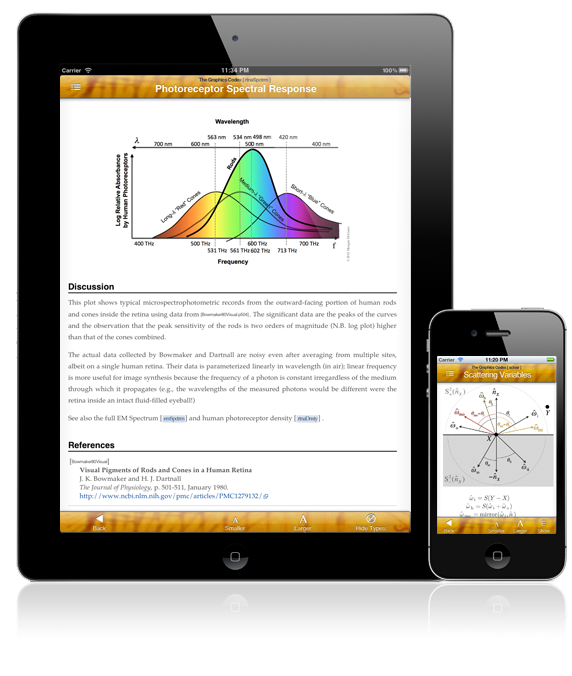
So, what is it? Well, let’s start with pictures:

We all have our own favorite pieces of information we like to see included. This codex fits me pretty well: I see the reflection and refraction formulas, and various matrix types described (perspective, rotation, scale, translation, skew, determinants, etc.). I see handy things like the formatting for printf, and the latex and HTML codes for Greek letters and for math symbols. I see pseudocode for object/object intersection and distance formulas, as well as various common sorting algorithms. I see raster and 3D file formats (nicely linking to original documents on the web, when available). That’s just for starters.

There are a lot of topics included, and you can see the whole list before purchasing. In the app topics are listed alphabetically, index-style, but that’s fine, as the normal way to access this work is to search the index. Some topics I don’t know a thing about, which is great – knowing what you don’t know is important. Seeing some of these concepts inspires me to learn about them (elsewhere – like I say, this app is a reference, not a textbook). Some topics I may rarely or never look at, such as the examples shown in the images above, but I like knowing they’re there. Given that the author is a professor and consultant, I understand why they exist: these are teaching aids, information you can easily pull up and show a student, client, or other developer to help explain a concept or algorithm.

That said, there are some minor gaps. Things that came to mind for me to test but that I didn’t find: compositing (“over”, etc.), sampling and filtering (e.g. sinc and Gaussian curves), dithering (but when did I last use that?), and regular expressions (which admittedly sometimes have variations between computer languages). There’s other stuff I wouldn’t mind having: all HTML letter codes, a decimal/hexadecimal table, etc., but these are trivial to find & bookmark from sites on the web. Some domain-specific things like the various architectural projections (e.g., the various axonometric projections) would be nice, but that’s very specific to me and Wikipedia mostly fills the gap. Someday I imagine there could be a framework for such codex apps to allow you to add your own index entries, similar to how you can make your own reference work on Wikipedia (update: Morgan notes that this feature exists for his app, it’s called “email him and ask for a topic to be added”). The difference is that this app gives you the core, relevant ideas and algorithms of computer graphics in a usable form, with a consistent style, and cross-referenced to only directly relevant articles. A single author and editor, focused on a single area, adds considerable value.

This is not the first time someone has collected such reference entries. The most direct “competitor” that comes to mind is Phil Dutre’s great Global Illumination Compendium. This is a free PDF, go get it. Its focus is indeed global illumination, and it’s quite an extensive reference in this area. I would say there’s about a 25% overlap with the Graphics Codex. Another resource that comes to mind is Steve Hollasch’s collection of USENET articles, free on the web. This collection is a bit ancient, but math and physical formulas don’t change quickly. It’s a pretty shotgun-scattered set of articles, more like Graphics Gemlets, but an interesting place to wander through and try for information.

Back to the Graphics Codex. Each index entry is nicely formatted and readable, and every page (except the Bibliography, which I have reported as a bug) can be made larger or smaller. This larger/smaller functionality works well, reformatting the entry to be fully visible side-to-side, vs. typical PDF zoom, where the page can become wider than the display.

All the entries are aimed to be for reference, such as hard information that you basically understand but want to get the precise formula or code. This is information you could eventually find on your bookshelf or on the web, but instead is quickly available for you by simply searching the index. You can’t actually search the entries themselves, and the bibliography doesn’t have back links, i.e., “which Codex entries reference this article?” These are minor niggles: entries use cross-references to other entries, and most entries have a reference to related books or papers, sometimes links directly to the reference, if online. Reference back-links are more useful in a textbook; for this reference, they’d probably mostly be clutter.

Summary

Negatives:

  • Can’t copy and paste, unlike a computer-viewable version. (There might be an app for that…?)
  • Doesn’t have everything I personally might need.
  • Entries themselves are not searchable.

Positives:

  • Searchable index makes finding things a snap.
  • Nicely formatted, color illustrations and pseudocode snippets.
  • Cross-referencing and original source references, with links.
  • Weighs much less than the related pile of books.
  • Has many to most things I like to have handy.

All in all, worth $3.99 to me.

The above are my own impressions, before reading the email Morgan sent me about the app. Here’s what Morgan said:

What I’m doing with the app is converting all of my course notes and the professional notes that I take with me consulting into easily searchable topics. This way I always have the reference material with me, without having to carry all of my graphics books between my home, office, lab, and remote sites. I usually cite not only the paper and book that material comes from, but the exact page, so that I can quickly find more information when I am in the same place as my books. DirectX, OpenGL, Unity, Mitsuba, G3D, and JOGL entry points link to their official documentation on the web. Unlike a PDF or Apple IBook, The Graphics Codex does all typesetting live so it reflows for the orientation and size of your mobile device, and zooming in recomputes the text rather than scrolling it off the side of the page.

I’m prioritizing topics that people e-mail me about and vote for on the website…and anything that I look up in my regular work immediately goes into the next version. Version 1.2 not only adds a bunch of new topics from convolution to quaternions but an all-new UI and the ability to show the types and units of subexpressions.

So, if you get the app and see something missing, email him and go vote!