Author Archives: Eric

Things I learned from the ACM

Well, not just from the ACM, but also from people involved in the Ke-Sen Huang and ACM Publications situation.

  • ACM SIGGRAPH membership also gives you access to just about all computer graphics papers in the ACM Digital Library. This I knew already, but found that others haven’t realized it. Any conference sponsored by SIGGRAPH is available, from what I can tell, e.g. I3D. I noticed a few weeks ago that the SIGGRAPH 2009  Posters were not accessible to me through this benefit; the ACM fixed this problem when I reported it.
  • Deep linking, where one site links directly to content on another site, is not illegal. The EFF notes that deep linking has not yet been found to be illegal by the courts. However, linking to sites providing infringing (illegal) copies of a work for download is contributory infringement.
  • “Sweat of the brow” compilations, such as the white pages of phone books, are not copyright. There is no original expression involved, so the Supreme Court ruled such are not protected. Paula Samuelson’s article in the Communications of the ACM (Google Scholar hits here) is a fascinating overview. Titles are not copyright. Elements such as the order in a Table of Contents are in a gray area, from what I can see. The ordering and grouping of the articles into sessions may be copyright protected – the courts have not ruled, as far as I know. Changing that order on an external web page would then not be copyright, since it would be a different “original” expression. Alphabetized or numerical ordering is not copyright protected.
  • You do not need to enforce your copyright to maintain it, unlike a trademark. You can ignore an infringement and not lose your rights. So the argument that a copyright must be protected now in order to preserve it in the future is incorrect.

Do you really display PNGs?

Digging up the luma palette images reminded me of a useful PNG I made back around 1996 or so, back when this file format was quite new. A peculiarity of the PNG file format is that it stores alpha separately, unmultiplied. For 3D work it is the norm for the color stored to be premultiplied by the alpha. I won’t go into the how and why; this topic is covered in our book on pages 139-140 and is discussed on Wikipedia, among many other places.

One nice feature of premultiplied images is that you can just ignore the alpha channel entirely when displaying them for preview. This is equivalent to compositing the image over a black background. With PNG, you are required to examine the alpha channel and multiply the RGB by it in order to get the right color to display. Unmultiplied alpha has a 2D photo sense to it, the RGB image exists everywhere and the alpha is masking some part of it. The alpha is not an integral part of the pixel, as it is in 3D.

On to the image:

alpha_test

I cobbled this together to be able to quickly check if a particular piece of software was respecting the alpha channel in PNG. Back then, most software didn’t, so what would be displayed is “This viewer does not support transparency”. Today, it’s pretty rare to find such flawed PNG readers commercially (I couldn’t find a current example for you to try). Still, I’ve found this image useful as a quick reality check for whether software is using the alpha in a PNG.

Lest we forget, it was the LZW patent in the GIF format that helped popularize PNG as a patent-free alternative for the web. The Unisys patent finally fully expired back in July 2004, so it’s a moot point now, but for awhile this was a patent enforced for tens of millions of dollars, with over 2,000 licensees. My favorite quote on the whole controversy was from a flak at Unisys giving spin about their positive role enforcing a patent on a technology unknowingly used in a file format that they didn’t invent:

But Unisys credited its exertion of the LZW patent with the creation of the PNG format, and whatever improvements the newer technology brought to bear.

“We haven’t evaluated the new recommendation for PNG, and it remains to be seen whether the new version will have an effect on the use of GIF images,” said Unisys representative Kristine Grow. “If so, the patent situation will have achieved its purpose, which is to advance technological innovation. So we applaud that.”

Constant Luma Palette

I was looking around my image files and found this:
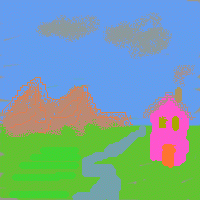
Constant luminance image

I made this incredibly hideous drawing back in 2001. What’s interesting about it is that if you convert this image to grayscale, using say Irfanview or XnView, it disappears entirely into a solid gray. Download and try converting it with your favorite image manipulation program (I refuse to insert a solid gray image of it here as “proof”).

Here’s the palette I used, in image form; the perl program for creating it is at the end of this post.

LUMA_PAL

My goal was to make a palette where you could draw anything, knowing that if it were converted to grayscale (e.g., via a scanner, or printed on a monochrome printer) it would become illegible. A similar technique was used long ago as a copy protection scheme for documentation for some computer games: print black on dark red and a photocopier would typically return all-black. Perhaps publishers that are against Google Books’ scanning of their works will use such a palette someday… I can only hope not.

What I found interesting about this little experiment was how differently we perceive the various colors compared to the constant luma computed. Grayscale conversion is supposed to take colors with the same impact and give them the same gray level. In my drawing, that pink is way brighter than the gray clouds, and even the green streaks on the ground at the lower left are brighter than the rest of the ground plane. It makes me wonder if there’s some better conversion to grayscale that more closely matches our perception of impact. Wikipedia mentions luminance as just one strategy; are there others that work better (on average)? Info, anyone? Update: a keynote at I3D 2022 by Dr. Margaret S. Livingstone discussed this very effect in depth; see her book Vision and Art for information about it.

Luma

So what’s luma, versus luminance? It turns out that the formula we typically use to convert to grayscale is flawed, in that what should happen is that the color to be converted should be put in a linear space, converted to grayscale, then gamma corrected. By applying the grayscale formula (see below) to the displayed image data directly, what most every image manipulation program typically does, we get the order wrong. However, it’s a lot more work to “uncorrect” the gamma (make the image’s channels represent linear values), apply a grayscale formula, and then gamma correct. Long and short, the grayscale value computed without taking into account gamma is called “luma”, to differentiate it from a true luminance value.

You can find more about this in Poynton’s color FAQ and Wikipedia, and details about the difference this makes can be found here. Relevant quote from this last source: “…introduces a few image artifacts that are usually fairly minor. The departure from the theoretically correct order of operations is apparent in the dark band seen between the green and magenta color bars of the standard video test pattern.”

I decided to reformulate the palette today and see what it looks like with constant luminance instead of luma, by raising the normalized palette values to the power 0.45. There’s a definite difference, as expected:


lumapal10x luminancepal10x luminancepal8

Left is the original luma palette, zoomed up (hmmm, should have used nearest neighbor); middle is the luminance palette, with gamma correction; right is another “slice” of the luminance palette, having 0.8 being the highest linear green value. These right two images do look more equivalent in visual impact to me. So a better perceptual grayscale, I suspect, is to correctly account for gamma. Trying this rightmost palette out, the image becomes:
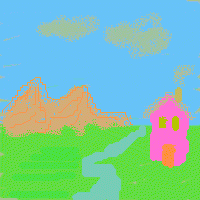
LUMINANCE_IMG

This looks a lot better to me, more equal. The green streaks on the ground are hardly noticeable now, for example. The pink house still looks a bit bolder than the rest, but otherwise is pretty reasonable. I’ll bet if I used the newer grayscale formula (see below) the pink might fade further—well, enough hacking for the day or I’ll never get this post done.

LCD brand does matter: my Dell LCD displays the image fine from most angles, the Macbook Pro screen definitely varies with vertical angle in particular, and it’s hard to know what the “right” angle is. Using Steve Westin’s old gamma page and aiming for 2.2 seemed to work.

In case you’re curious, here’s what the grayscale image looks like for this luminance-balanced image, using XnView:

LUMINANCE_grayscale

Which to me emphasizes the weaknesses of using luma instead of luminance: the house is darker, the clouds are lighter in grayscale? Not to my eye.

Gory Details

Conversion to luma Y’ grayscale uses a formula such as:

Y’ = 0.212671*R’+ 0.715160*G’+ 0.072169*B’

from Poynton’s color space FAQ; it’s the common form for contemporary CRTs.

Or older ones such as:

0 299
0 587
0 114
’ = ’
+ ’
+ ’

Y’ = 0.299*R’ + 0.587*G’ + 0.114*B’

from Poynton’s FAQ and used in his Digital Video and HDTV: Algorithms and Interfaces. This is the one I used back in 2001.

Or:

Y’ = 0.2904*R’ + 0.6051*G’ + 0.1045*B’

from Dutré’s useful Global Illumination Compendium – download it free.

Here’s the Perl program, which outputs to a PPM file.

printf "P3\n16 16\n255\n";
for ( $r = 0 ; $r < 16 ; $r++ ) {
    for ( $b = 0 ; $b < 16 ; $b++ ) {
        $red = $r * 255 / 15 ;
        $blue = $b * 255 / 15 ;
        # The 255 below can be set in the range 180-255 for different constant palettes.
        $green = 255 - $red*0.299/0.587 - $blue * 0.114/0.587 ;
        printf( "%d %d %d%s", $red+0.5, $green+0.5, $blue+0.5, ($b==15)?"":" " ) ;
    }
    printf("\n") ;
}

If you make the starting point for green lower than 180, the green channel would take on negative values.

printf "P3\n16 16\n255\n";
$gamma = 1/0.45;
for ( $r = 0 ; $r < 16 ; $r++ ) {
    for ( $b = 0 ; $b < 16 ; $b++ ) {
        $red = $r/15;
        $blue = $b/15;
        # The 0.8 below can be set in the range 0.703 to 1 for different constant palettes.
        $green = 0.8 - $red*0.299/0.587 - $blue * 0.114/0.587 ;
        # gamma correct
        $red = 255 * $red**(1/$gamma);
        $green = 255 * $green**(1/$gamma);
        $blue = 255 * $blue**(1/$gamma);
        printf( "%d %d %d%s", $red+0.5, $green+0.5, $blue+0.5, ($b==15)?"":" " ) ;
    }
    printf("\n") ;
}

SMOG Results

My wife just told me about the SMOG readability formula, which is evidently widely used. “SMOG” stands for Simple Measure of Gobbledygook. It looks for the number of polysyllabic words (3 syllables or more) used in a document. The square root of the result of dividing the number of polysyllabic words by the number of sentences is used to derive a readability grade level; read more on Wikipedia.

I ran the calculator here on a few passages in our book (those without equations, which I thought would throw the calculator off): Deferred Shading, Fresnel Equation, Scene Graphs, and the final chapter. Scene Graphs was simplest, at 12.56, Fresnel hardest, at 14.1. On average the level was a bit above 13, meaning College Freshman level. Pieces such as this one weigh in at 17.12. I took a piece of text from Hearn and Baker’s old Computer Graphics, C Version, 2nd Edition, on Fractals, and it came up as 14.47. So our book’s no Hop on Pop, but it’s at least not horrifically hard and seems in the ball park for our target audience.

By the way, this post’s SMOG grade is 11.21.

Looping Through Polygon Edges

We mostly avoid coding issues in our book, as our focus is on algorithms, not syntax and compiler vagaries. There’s a coding trick that I want to pass on, as it’s handy. Graphics programmers appear to be divided into two groups with this method: those who think it’s intuitively obvious and learnt it on their pappy’s knee, and those who never saw it before and are glad to find out.

You want to loop through the edges of a polygon. The vertex data is stored in some array vertexData[count], an array of count of some sort of Vertex data structure. The headache is attaching the last and first vertices together to make the connecting edge. There are plenty of weak ways to walk through the edges and connect last and first:

  • Double the beginning vertex so it’s added to the end of array; the final edge is then just another pair of adjacent points. This is perhaps even fastest to actually execute but is generally a hideous solution, adding a copy of a vertex to the array.
  • Form the last edge explicitly, outside the loop. Poor for maintenance, as you then need to copy whatever other code is inside the loop to be called one more time.
  • Use an “if” statement to know if you’re at the end of the loop; if so, then connect the first and last vertices for the last edge. The “if” special case is needed for only one vertex, which is wasteful and we’d like to avoid “ifs”.
  • Use modulo arithmetic on the counter for one of the vertices, so that it loops back to the start.

Modulo isn’t terrible, but is overkill and costs processing speed, as the modulo operation is truly needed for only the very last iteration:

for ( int v = 0; v < count; v++ ) {
   // access vertexData[v] and vertexData[(v+1)%count] for the edge
}

Here’s the solution I prefer:

for ( int v1 = count-1, int v2 = 0; v2 < count; v1 = v2++ ) {
   // access vertexData[v1] and vertexData[v2] for the edge
}

The simple trick is that v1 starts at the end of polygon, so dealing with the tough “bridge” case immediately; v2 counts through the vertices, and v1 follows behind. You can, similarly, make a pointer-based version, updating the pV1 pointer by copying from pV2. If register space is at a premium, then modulo might be a better fit, but otherwise this loop strikes me as the cleanest solution.

This copy approach can be extended to access any number of neighboring vertices per iteration. For example, if you wanted the two vertices vp and vn, previous and next to a given vertex, it’s simply:

int vp, v, vn;
for ( vp = count-2, v = count-1, vn = 0; vn < count; vp = v, v = vn++ ) {
   // access vertexData[vp], [v], [vn] for the middle vertex v.
}

I’ve seen this type of trick in code in Geometric Tools, and Barrett formally presents it in jgt. I mention it here because I think it’s a technique every computer graphics person should know.

Site Updates

I just spent a good part of this week revamping a few pages on this website, namely:

  • The main resources page: I removed a few dead links with Xenu (great free tool) and folded in resources from a year’s accumulation of 139 links. It barely shows – I don’t highlight the new links like I used to, since most of these have already been posted in the blog. I did spend way too much time updating the list of relevant books and related resources; remember to hit “refresh” on your browser.
  • The recommended books page: revamped to newer editions, some books added and a few dropped (e.g., I’ve given up waiting for the new Foley & Van Dam, at least on this page). Naty hopes to redo this page at some point when he finds time.
  • The portal page: the main addition is expansion of the obsessive-compulsive list of blogs I attempt to track.
  • The intersections page: unfortunately, some links had died and so were removed. One or two minor additions; this area of algorithm exploration seems mostly “done”, despite there being some obscure blank spots on the grid (most having to do with intersecting cones against other things).

Exhausting to do all this, and without a tremendous visual effect, but I’m glad to check it off the list.

Clearing the Queue

I’ve have a goal this week (it should be clear by now) of clearing my queue of stored-up RTR links by my birthday, today! (Hint: I want a pony.) So excuse the excessively-long list o’ links. Next task on my list, update the main RTR page itself.

  • StructureSynth. This looks pretty cool, and I love procedural models (my ancient SPD package was all about this, back in the days when downloading models was oppressively slow). I do wish they just provided an executable – building looks like a pain.
  • That previous link was on Meshula.net, which also blogs about Pixel Bender Fractals. Great stuff, sort of steampunk computer graphics: you must click this link, if no other on this page, and look on in awe.
  • Shapeways has a blog, and it’s not just dull company announcements. I’m glad they find people as pixels as interesting as I do. They also cover exporting Spore characters to Collada files (which is a great addition to Spore) and creating physical models from these.
  • In related news, The Economist has a reasonable summary of some trends in 3D printing. Their Technology Quarterly also has articles on Augmented Reality, 3D displays, and CAPTCHAs, among other topics.
  • This is one more reason the Internet is great: an in-depth article on normal compression techniques, weighing the pros and cons of each. This sort of article would probably not see the light of day in traditional publications, even Game Developer – too long for them, but all the info presented here is worthwhile for a developer making this decision. Aras’ blog has other nice bits such as packing a float into RGBA and SSAO blurring.
  • I need to add a link to the article itself to the object intersection page, but Morgan McGuire recently verified that he found this ray/box algorithm super-fast in SIMD. Code’s downloadable from that page, free version of article is downloadable here. Morgan uses this test in the ray tracer for his cool photon mapping paper at HPG 2009; if nothing else, you should at least see the video.
  • In related news, I am happy to see that AK Peters is beginning to put past journal of graphics tools articles online. At $15 each, the price of an article is quite high for individuals (or at least this individual), but current journal of graphics (gpu, & game) tools subscribers have full access to this archive for free. The mechanism to get access is a little clunky right now: if you’re a subscriber, you need to register with Metapress, then tell AK Peters your userid and they’ll provide you access.
  • Related to this, I hope Google Books conquers the world (or anyone else doing similar work, as long as it isn’t Apple or Amazon or other overcharging closed-box “we’re just protecting the authors, who get 10% or less for a purely digital sale with nil physical cost to us per unit” retailers – rant over, and I do understand there are fixed start-up costs for the retailer/publisher/etc., but really…). Google Books is so darn handy to look for short articles in books at Google’s repository, such as this one giving a clean way to build an orthonormal basis given a vector, from Graphics Tools: The JGT Editors’ Choice.
  • Humus provides a whole slew of new cubemaps he captured, if you’re getting tired of Grace Cathedral.
  • CUDA itself (vs. others) may or may not be a critical technology, but what it shows about the underlying GPU architecture is fascinating.
  • It should be mentioned: August 2009 DirectX SDK is available. Includes the first official release of DirectX 11.
  • This is hilarious, and possibly even useful!
  • I love seeing things like this: build your own multitouch display. Not that I’ll ever do it, but I hope others will.
  • You might be sick of Larrabee news (ship one, already!), but I found Phil Taylor’s article pleasantly hype-free and informative.
  • ATI’s Eyefinity (cute marketing name, I must admit – now I want to use the word everywhere) seems to me to solve a problem that rarely occurs: too much GPU for too few screens. Still, it’s nice to have the option. Eyefinity allows up to six monitors to be driven by a single GPU. I guess Eyefinity is useful when running older flight simulator programs on newer GPUs; otherwise, Eyefinity is pretty irrelevant. Eyefinity, eyefinity, eyefinity. At work I find two displays is plenty, one to run, one to debug. Anyway, the sweet spot for the monitor:GPU ratio is 13:1, as can be seen here:
    Flight Simulator - living the dream
  • There’s an article on instancing animated grass using DX10 on Gamasutra.
  • Humus’ summary of z interpolation is a good summary of the topic. He gives some of the key tricks, e.g., if you’re using floating point, use a near=1.0 and far=0.0 to help preserve precision.
  • Here’s a basic tutorial on different projection methods used in videogames, with lots of visual examples (add “Zaxxon” and it’s complete, for me). The one new tidbit I learnt from it was about reverse perspective, an effect I’ve made myself once every now and then when I screw up a projection matrix.
  • While I’ve been on break (one of the reasons I’ve been posting so much – Autodesk gives wonderful 6 week “sabbaticals”, aka “long vacations”, to U.S. employees every four years you’re there; it’s like being French or Swedish every fourth year), the rest of the company’s been busy: this new sketch application for the iPhone looks pretty cool, at the usual $2.99 “cup of coffee” type price.
  • Caustics can be dangerous. I can attest to this myself; a goofy award Andrew Glassner gave me long ago sat on my windowsill for years (I moved once, as you should discern from the picture), until I noticed what was happening to the base:
    caustics
  • I usually don’t have time to keep up with Slashdot, but SeenOnSlash, the funny bits of SlashDot, is sometimes entertaining. Graphics-related example: AMD’s latest chip.

Seven Programs for September 16th, 2009

  • LLVM compiler. A number of people at the High Performance Graphics 2009 symposium were impressed, or even using, this new compiler. It’s new, based on recent research on compilers and optimization, and is supposed to be darn good. More here, with page 3 talking about Apple’s use of it for GLSL code optimization.
  • Very Sleepy CPU Profiler. Free, of course, and works directly on any Windows app with PDBs. Sounds pretty convenient if you don’t have access to a reasonable profiler, or just want to try a different one (I’ve found profilers sometimes have blind spots or peculiar biases). Bonus link at the same site: summaries and links to classic graphics papers. The first sentence on this page made me laugh.
  • Vista Gadgets. I use the NVIDIA temperature gadget, the memory monitor’s also handy. An alternate temperature gadget is here.
  • NVIDIA NEXUS. Debugging GPU code with PIX is flakey at best; I have high hopes that this product from NVIDIA will be much better. It’s something NVIDIA will charge for (a first for NVIDIA, I think), and that’s fine by me if it does a noticeably better job.
  • NVPP. A CUDA library of functions from NVIDIA. I haven’t tried CUDA, but this library looks worthwhile. To be honest, in the long-term OpenCL or compute shaders look like the popular future for commercial products vs. research, since those two are multi-platform. CUDA is much more developed at this point, however, and I’ve heard that whatever techniques you learn using CUDA can almost always be applied to the other two. So, I’m on the fence waiting for a winner, since I have no personal reason to use any of them at this point.
  • VMMap. A little free application that shows where all the memory went.
  • OverClock Checking Tool. I kinda forgot people still overclock. This utility is interesting even if you don’t, if nothing else than to check if things are working. It’s a bit exciting to hear my GPU’s fan kick into overdrive as the temperature climbs to 87 degrees Celsius (188.6 Fahrenheit). I also learnt a little more about my Intel Core 2 Quad CPU: it “idles” at 2.0 GHz, but jumps up to 2.66 GHz when running something serious. I wimped out on going ahead with the Power Supply test, as their warning kept me away.

Seven Things for September 15, 2009

  • RapidMind is now a part of Intel. Which I think is a good fit; RapidMind does some interesting multicore techniques. Anything that makes multicore programming easier for a larger group of people is all to the good.
  • I3D 2010 Call for Participation. October 23rd for papers, December 18th for posters – submit! I3D will be in Washington, DC, February 19-21.
  • Dirty Coding Tricks in Gamasutra. A reprint of a Game Developer article, I’m glad to see it online – it’s pretty amusing in places. The hack at the top of page 2 is my favorite.
  • Carmack on the iPhone 3GS. Now the iPhone begins to face the same problem PC developers have to deal with: different levels of GPU support. At least there will be only one line of Apple phones, vs. multiple IHVs with a wide range of offerings at different price points, etc.
  • Mendeley Bibliographic Database. Manny Ko mentioned this one to me, and it looks interesting: a number of tools to pull in PDFs, get their references, let you annotate them, etc.
  • O’Reilly’s author guide. A surprisingly open and honest guide to how you as an author deal with publishers, specifically O’Reilly. Many publishers consider their contracts and royalty terms to be trade secrets, so it’s refreshing to see this information given in a straightforward manner.
  • aM Laboratory ToneMatrix. Pretty fun, and it reminds me of an experimental device seen at SIGGRAPH a few years ago. To see the most elaborate (and beautiful) web app ever, click on the AudioTool link, Start AudioTool, then pick DrumNBass. Scroll around. Click the menu in the lower left corner. Amazing.