CryEngine3 presentation

This detailed presentation on Crytek’s latest engine at the regional Triangle Game Conference slipped completely under my radar, but Wolfgang Engel just pointed it out to me.  It’s on Crytek’s presentations page, which has a bunch of other good stuff on it as well.

The presentation includes lots of great information on their new deferred lighting system, which is timely since I am just working on a lengthy blog post on this very subject (hopefully to be finished soon).  They also tease about their new dynamic global illumination system, to be presented at SIGGRAPH 2009.

Odds and Ends

It’s 5/7/09, a nice odd sequence, so time for a few odds and ends I’ve collected.

OK, this is worth a few minutes of your life: the elevated demo is awe-inspiring. Terrain generation (be patient when you start it), fly-by’s, and music, all in less than 4096 bytes. By way of comparison, an empty MS Word document is 9834 bytes. (thanks to Steve Worley)

Google has put out a browser-based low-level 3D graphics API called O3D. API here. Demos here. Some initial impressions here. It will be interesting to see if they succeed where so many others have failed.

There is a call for participation out for a new book series called “Game Engine Gems“, edited by Eric Lengyel. (thanks to Marwan Ansari)

The main thing I look at on the SIGGRAPH exhibition floor are the book booths. Good books are such a ridiculous bargain: if a book like Geometric Tools saves a programmer 2 hours of time, it’s paid for itself. One new book that I want to see is Real-Time Cameras, by Mark Haigh-Hutchinson, which came out this April. Looking around for more info, I noticed this sad note. I never met Mark, but we corresponded a few times. He came up with a clever idea to avoid performing division when doing a point in polygon test; I folded this into the CrossingsMultiplyTest Graphics Gems code here, crediting him.

I’ve been looking at GPU capabilities and benchmarking information lately. Some nice resources:

  • You probably know about the benchmarking group Futuremark. Me, I hadn’t realized they had useful stats at their site: see the Futuremark ORB links at the bottom of the page and start clicking.
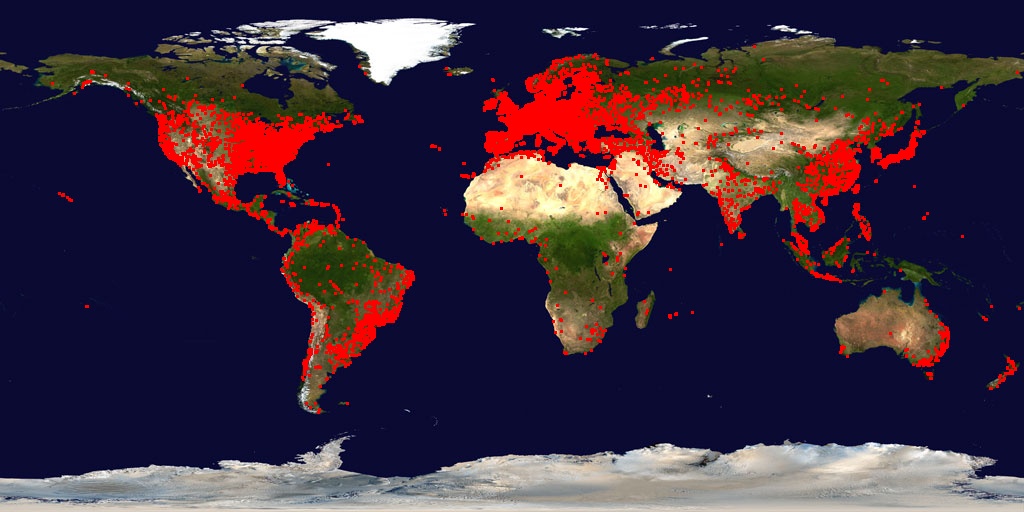
  • Two applications that tell you a ton about your card’s capabilities: GPU-Z, with a ton of information and a statistics page & cute map of downloads at their site, and GPU Caps, which also includes CUDA-related information and some nice little OpenGL benchmarks.
  • Chris Dragan has a web database that provides a fair amount of data on card support for DirectX capabilities and OpenGL extensions.
  • The Notebook Check site had way too much information about many laptop graphics accelerators.
  • nHancer is a utility for NVIDIA cards. It lets you get at all sorts of different capabilities on your GPU, on a per-game basis. There are also interesting antialiasing and anisotropic filtering comparison pages (click on the radio buttons). (thanks to Mauricio Vives)
Some interesting libraries I ran across lately:
  • GTS is an open-source mesh manipulation package.
  • Box2D is a 2D physics engine.
  • Touchlib is a multitouch development kit. (thanks to Morgan McGuire)

Coincidental world: it turns out there’s a different “Eric Haines” out there that made a well-received 3D graphics game for the iPhone, Realmaze 3D. I’m not sure how it compares to his The Magical Flying Pink Pony Game, which looks awesome. (thanks to Nikolai Sander)

I’ve seen similar real-world illusions, but still thought this one was pretty great. (Addendum: Morgan McGuire found this even-better video of the effect.)

Computer-modeled stop motion in “Coraline”

This is a bit old, but still cool: the film Coraline (based on a great book by one of my favorite authors) was stop-motion, not CG.  However, the facial animation was extremely smooth, due to a unique process.  The expressions were modeled by computer, exactly as they would have been for a CG animated feature.  Then for each frame, the faces were “printed” out on a “3D printer” (rapid prototyping machine).  These tweened “frame faces” were swapped in for each stop-motion frame.  CGSociety has an article describing the production pipeline for this film, an intriguing combination of CG and stop-motion animation.

Left-Handed vs. Right-Handed Viewing

In my previous post I talked about how I think about left-handed vs. right-handed world coordinate systems. The basic idea is simply that there is an underlying reality, and the coordinate system choice is yours.

I compared notes with Jeff Weeks, a topologist friend (who wrote this cool book The Shape of Space that is not full of math symbols, but is just the opposite – approachable and fun, and what you should read after Flatland and Sphereland). Happily, he agrees. He also introduced me to another word for handedness: chirality, coined by Lord Kelvin. Jeff notes an interesting distinction:

You can ask whether the object’s own intrinsic coordinate system agrees with the ambient world space coordinate system (same chirality) or disagrees with the ambient world space coordinate system (different chirality), but you can’t meaningfully call either one of them “left-handed” or “right-handed”.

In other words, the only time you can meaningfully introduce the words “left-handed” and “right-handed” into the discussion is when a human being enters the picture.  Once an object (or a space) gets drawn into the human’s physical space, then “left-handed” means “same chirality as the human’s left thumb-index finger-middle finger” and “right-handed” means “same chirality as the human’s right thumb-index finger-middle finger”.

So in particular, data sitting in a file on disk has no intrinsic chirality. What it has is the author’s intention that it be drawn into the human’s physical space with one chirality or the other (so that, for example, the steering wheel in a car model appears on the left-hand side of the vehicle, as perceived by the human viewing it).

OK, so only for viewing you must also know the handedness of the data. We also know it’s fine to have local coordinates that are RH or LH inside a world that is LH or RH, e.g., you create a frog model by mirroring the right half of your frog model with a mirror matrix, but the world itself is one or the other. So far so good.

Where things get tricky in computer graphics is when we talk about something like a right-handed coordinate world and a left-handed viewing system. Right-handed coordinates are pretty common: all Autodesk applications I know use them. It’s a natural extension of a 2D Cartesian plane to make the Z axis point upwards – a 2D floor-plan that is extruded would be thought to extend upwards from the ground, for example. Also, the determinant of a right-handed viewing matrix is positive; left, negative.

However, a left-handed viewing system is used by default by DirectX: the viewer’s X axis goes to the right, the Y axis is up, and Z goes into the screen. This also feels natural, as you label the screen’s X and Y axes from the lower left corner of the display and Z increases with depth into the screen. OpenGL’s viewing system is right-handed by default, the difference being that +Z goes towards the viewer. This negation leads to a fair bit of confusion in documentation with what near and far mean, but it’s consistent with right-handed world coordinates.

So what if you want to use a left-handed viewing system with right-handed data, or vice versa? All it means: there must be a conversion from one to the other, or expect mirrored images. Like my first post notes, the world coordinate system chosen is arbitrary: your RH system or the mole men’s LH system are both fine, you just have to decide which one to use. However, once you choose, that’s it – the view itself ultimately has to be working in the same system, one way or another. It is honestly meaningless to say “I want to use LH viewing with RH world coordinates”, if you want to do so “without conversion”.

Some transform has to be done to go from RH to LH, but which one? Any mirroring transform can mirror through any arbitrary plane will convert from one chirality to the other. Mirroring along the world’s Z axis is one common solution, i.e., set Z’ = -Z for vertices, normals, light positions, etc. If the scene’s data is converted once to LH space, case closed, your LH camera will work fine.

However, say you don’t want to touch the data. Microsoft gives a way to convert from RH to LH, which boils down to again mirroring along the world’s Z axis as the first transform on the view matrix, i.e., done every frame. No time is lost, since the mirroring is simply part of a different view matrix. The funny bit is that you have to deal with the world in RH, the view in LH, as far as defining where the camera goes and how it is oriented. A common way to define a view is by giving a camera position, a target it is looking at, and an up direction. From this you can form a view basis, a matrix to transform from world to view. By Microsoft’s method, you have to make sure to use LH positions and vectors for forming your camera (with Z negated), vs. the RH coordinate you use for your data. Confusing.

There’s another somewhat sensible place to perform mirroring: go from RH to LH at the end of the transforms, after projection to clip space. You’re given a right-handed camera position, target, and up vector and you use these to make a left-handed view matrix – there’s nothing stopping you. None of these coordinates need to be transformed, they can be defined to be the same in RH and LH spaces. However, what will happen is that the image produced will be mirrored along the vertical axis. That is, left and right sides will be switched, since you didn’t compensate for the difference in chirality. Lots of models are symmetric, in fact, so this sort of mistake is not often immediately noticeable. By adding a simple mirror matrix with X’ = -X you can swap the left and right of the screen. This comes down to negating the upper-left value in the projection matrix.

By using this mirror matrix at the end, you’ve made your left-handed coordinate system into a right-handed one. Each time you move the camera, you’re essentially defining a new and (usually) different mirroring plane in world space, one that passes through your eye, target, and up vector. This mirror matrix will then not affect the eye, target, and up directions, since they lie in this plane. Maybe that’s fine for your system. However, this solution can also mess up basic operations and queries. Say you want to pan the camera to the left. So you query your camera for which direction it thinks is left. It hands you one, you move the camera that direction, but the view shifts the other way. This is because you have a mismatch in chirality: your camera’s basis is in LH, but you correct it at the back-end to be RH. The view matrix returned a left-vector which was also in LH, and needs to be converted to RH. Also confusing.

The whole point of the camera is to transform some chunk of visible space into clip coordinates, which then convert (by dividing by W) to NDC coordinates (visible space being -1 to +1 in X and Y, -1 to +1 in Z for OpenGL, 0 to +1 in Z for DirectX). Neither OpenGL nor DirectX in any way requires LH or RH coordinates, you can feed in whatever view transforms you like. Just make world and view chirality match and be done with it.

That’s about it – just make them match, and do so by setting the view (lookat) matrix to match the world’s chirality. At least, that’s my take, this week (which sounds flip, but I’ve been trying to get a good handle on this area for a long time; I like to think I now have one, as of today). If there are other ways to think about this area, and especially if I’ve made any mental errors, please do comment.

By the way, if you want an enjoyable book about handedness and symmetry, get Martin Gardner’s The New Ambidextrous Universe. It talks about some surprising stuff, such as experiments where parity in the universe is not conserved (so if you’re ever mirrored a few times through the fourth dimension on your way to a distant planet, you’ll know how to test which way you came out).

Oh, and also check out Jeff Weeks’ site – some fun and beautiful OpenGL math applications there for free, Mac and Windows, with source. I should note that he uses LH throughout for his OpenGL applications, the rebel. There’s no “correct” coordinate system, so choose your own.
Eurographics Workshop on Natural Phenomena 2009

EWNP has had interesting papers in recent years, but when it skipped 2008 I thought it was gone.  However it came back in 2009 with five papers, all of which are online except for one:

Procedural Modeling of Leather Texture with Structural Elements:  Not currently available online, but judging from a previous paper by these authors this appears to be about procedural modeling of the cracks and bumps in leather surfaces.  Most real-time applications will use photographed or manually created textures for this, so it is probably not of wide interest to real-time developers.

Interactive Modeling of Virtual Ecosystems: Automatic modeling of plants taking lighting, obstacles, etc. into account.  Might be useful as an automatic modeling tool.

A Geometric Algorithm for Snow Distribution in Virtual Scenes: What the title says; might be useful for automated scene modeling, but probably not for runtime use.

Corotated SPH for Deformable Solids: Smoothed Particle Hydrodynamics (SPH) is commonly used in film production for liquids, smoke, etc.  This paper discusses how to extend the technique to model deformable solids.  Probably not real-time anytime soon.

Real-Time Open Water Environments with Interacting Objects:  This combines the Tessendorf FFT-based method for ambient waves with a different method for interactive waves (waves interacting with dynamic objects).  This is the most relevant paper for real-time rendering; worth a read.

Tessendorf’s FFT method is the current gold standard for non-interactive ocean waves, and is widely used in game and film production.  A description of it can be found on his publication page, under Simulating Ocean Surface.  Tessendorf’s publication page has many more papers of interest, including an algorithm (called iWave) for interactive waves and reports on particle and volume rendering for film production.

Insomniac have a particularly efficient and flexible implementation of a variant of Tessendorf’s method, which they extended to support interactive waves as well.  This method was used in the game Resistance 2, and Insomniac Games have kindly published not just a white paper on the technique, but actual working code! This is part of their admirable Noctural Initiative for technology sharing.  The Noctural Initiative website is highly recommended, as it includes code which has been used in successful game projects by one of the most highly-regarded studios in the industry.

Another interesting approach to interactive waves is Wave Particles, which is described here.

Graphics Interface 2009 papers

The list of papers accepted to Graphics Interface 2009 (with abstracts) is now online.  Graphics Interface has had some pretty good real-time rendering papers: here is a handful of examples from the last few years.  Judging from this year’s abstracts, the following look particularly interesting:

Fast Visualization of Complex 3D Models Using Displacement Mapping: This looks like a combination of the “sparse voxel ray casting” approach popularized by id software with “relief mapping” approaches.

Depth of Field Postprocessing for Layered Scenes Using Constant-Time Rectangle Spreading: This is closely related to one of my favorite I3D 2009 posters, “Faster Filter Spreading and Its Applications”.  The basic idea (which has also been discussed in this paper by Dan Piponi) is to “splat” rectangles in constant time (independent of the rectangle size!) by “splatting” just the corners into a buffer, from which a summed-area table is constructed (using existing fast methods), yielding the desired image.  This can be extended to more general splats.  Although there is no preprint yet, the tech report is available.

An Analytical Approach to Single Scattering for Anisotropic Media and Light Distributions:  A follow-on paper to one published in Eurographics 2009, it adds anisotropic phase functions and more general lighting.  The basic solution is similar to an earlier paper by Bo Sun and others, but using a slightly different approach that enables increased precision.

Rendering the Effect of Labradorescence: This is of interest to me as an optical reflectance geek, but I doubt anyone will be using it in a game anytime soon.  This paper presents a physically-based method of rendering a complex optical phenomena that exists in gems such as Labradorite and Spectrolite.

Ke-Sen Huang’s Graphics Interface 2009 page should be a good place to hunt for preprints of these papers as they appear.

Good list of classic graphics papers

Old graphics papers don’t get enough respect nowadays; for example, Porter and Duff’s original paper is still the best place to get a good understanding of alpha blending (which too many people get wrong nowadays). There are many more gems to be found in papers from the 70s and 80s.  A while ago, I pointed out Pixar’s online paper library, which includes a lot of “golden oldies” (as well as good new stuff).  I just saw this great list of old papers on the codersnotes blog. I heartily concur with Kayamon’s assessment of the value of an ACM digital library subscription, though I wish ACM would find a way to go the Open Access route.  It’s not just a matter of expense; the registration wall adds a huge amount of friction to the process of finding information.

Exploiting coherence at GDC 2009

A few months back, I wrote a blog post discussing techniques which exploit coherence, either spatial (like multiresolution rendering) or temporal (like reprojection caching).

Both of these were represented at GDC this year.  Jeremy Shopf presented a talk on Mixed Resolution Rendering, and the ambient occlusion technique presented in the talk Rendering Techniques in Gears of War 2 (available on the GDC Vault site) made use of both methods.  The ambient occlusion factors were rendered at a downsampled resolution. In addition, reprojection caching was used to reduce temporal aliasing.  This is the first use I have seen of reprojection caching in a shipping game.

In my previous blog post, I was skeptical of reprojection approaches, since it seemed to me that as an optimization method they did not address the worst case (where the camera angle changes abruptly).  Using such approaches to improve quality instead (as Epic did) makes more sense.

More GDC conference links

More material from GDC is coming online each day. We have already mentioned the tutorial slides, as well as Intel’s pageGDC’s Vault site has video which is only available to registered attendees (except for sponsored sessions), but the slide decks are available to everyone.  NVIDIA recently put up a new page with their material – even the material previously available from GDC’s own sites is worth getting from here, since the versions on NVIDIA’s page are significantly more up to date.  The videos for NVIDIA’s sponsored sessions are free for everyone and are linked from the NVIDIA page as well.

Lots of OpenGL and OpenCL stuff is available on the Khronos web site,  and Jeremy Shopf and Jim Tilander have their respective slides up as well. A Google Search for ‘”GDC 2009″ slides’ should turn up more as time goes by.