I’ve been beavering away on my part of the Interactive Rendering course for Udacity and Autodesk. It’s a free MOOC – massive open online course – and I’ll talk more about what I learned from doing it when the course nears completion. For now, the main takeaway I have is “WebGL plus three.js is a pretty good combination for teaching graphics on the web.” The fact that WebGL is built into most browsers (sad slow head-shake to Microsoft Internet Explorer at this point) means you can point a student to an URL and they can immediately see and play with an interactive demo. Three.js is a scene graph library which simplifies for the student the mass of initialization and whatnot that WebGL requires, while also not hiding a lot of functionality from the programmer (like some scene graphs do). Bonus bit is that the Chrome browser has a JavaScript debugger built in (just hit F12 or ctrl-shift-I to toggle it on), so students can always look at the underlying code.
So, here’s my New Year’s thingy for you to try out:
The Teapot – nicer controller, not currently working on mobile
The Teapot – semi-mobile friendly, annoying trackball
[Mac/Safari users: follow these simple instructions to enable WebGL on your machine. Other users: if stuck, try this site.]
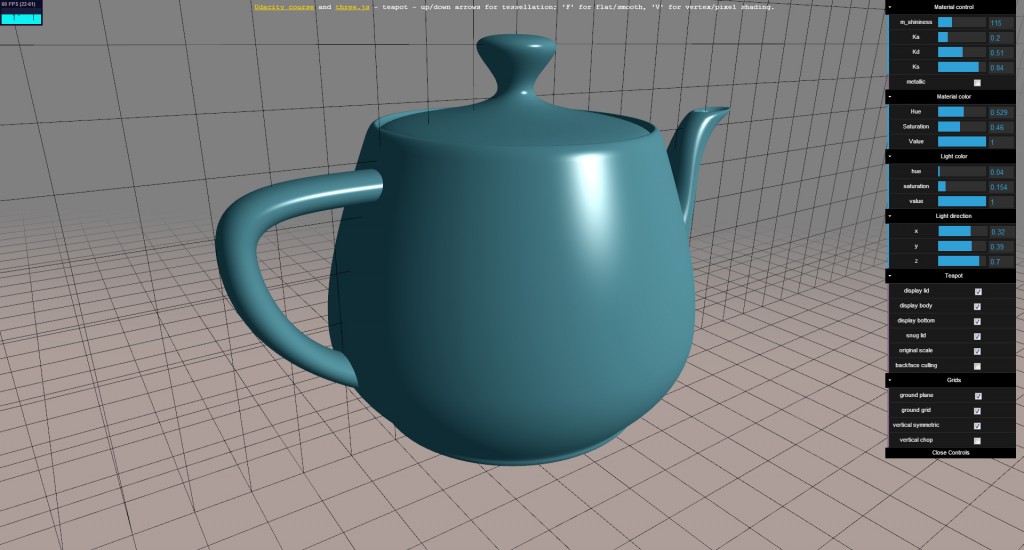
Nothing deep, as it’s meant for teaching about Gouraud vs. Phong shading: the mouse changes the view (left: trackball, right: pan, middle: zoom), there are a few keyboard controls to switch from vertex to pixel shading and change the tessellation, a GUI for messing with the model and scene, and a little FPS counter in the corner. If the mouse or GUI doesn’t work the first time, hit refresh (and if anyone knows a fix for this glitch, speak!). If you see the FPS counter consistently below 60 FPS for your machine, please let me know your hardware configuration. The heresies I commit in this program:
- You can add a bottom to the teapot (SJ Baker’s excellent page considers this a major sin).
- You can expand the lid 7.7% horizontally to give a solid seal between the teapot and the lid (this gap looks goofy to unbelievers).
- You can scale the model up by 30% so it actually looks more like the real teapot (read the end of this section for one explanation of why the model was changed – short version: Blinn hack to adjust for non-square pixels).
Nice, but there is a problem on MacBook Pro Retina; Only the upper 1/4th of the page is rendered 🙁
… Problem is limited to Chrome. In Safari and Firefox it works fine 🙂
Pingback: Real-Time Rendering · Wow, that worked?
Ok, super cool, but a short rant. I’m not sure if this is your fault or three.js’s fault, but the madness must stop. For camera movement you have the typical “virtual trackball”. But most implementations of this – and yours! – suffer a terrible problem. The up in the scene drifts all over the place making navigation super hard. Here’s the test: drag the mouse in small circles on the screen. If the teapot slowly turns upside down, you have the problem. Even though the user is bringing the mouse right back to where it started, the teapot is not in the same position. And really, how often when navigating a scene do you want to see it upside down?
The better way to do this is also simpler! No “virtual trackball”. Just map the mouse movement in screen X to a rotation around the “up” axis (be it Y or Z). Map the mouse movement in screen Y to a rotation tipping the object forward and backwards towards and away from the viewer. the X rotations spins all the way around the object 360 degrees, over and over as you drag in X. But the Y rotations never go more than +/ 90 degrees. You can look down from the top, from the side, or up from the bottom. But never back down the back upside down.
You can add extra controls to spin about the axis pointing out of the screen in cases where you really want to go upside down.
So, I know this is not the point of the demo, but I just had to rant and doing so here might do some good.
DEATH TO THE VIRTUAL TRACKBALL!
That’s a very fair comment on the trackball, and I’ve debated this myself: full flexibility, or up always up and gimbal lock when you try to look down on the model? “My” trackball is simply the canned trackball that a bunch of three.js demos use, called “TrackballControls.js”. Hmmm, thinking about it, maybe the answer is yet another thing to toggle: trackball vs. what I call “turntable”. Anyway, thanks for the feedback, it’s definitely good to get this sensible for the course itself.
And I burnt the morning on fixing this orbit controller – three.js doesn’t have one I like, so I extended OrbitControls.js to make a better one. Done! Try the new version and see if you like it. I’ll check it into three.js once I feel great about it (needs a few weeks of iteration). Unfortunately, this new control does not work on mobile devices (yet), so it’s not the default. It’s here.
Pingback: Brief Look at the Interactive Rendering Course – MOOC Feeds from around the World